
Rank in the map pack
Turn location data into search-ready schema, useful landing-page content, and a visitor-friendly Store Finder without putting geolocation or third-party APIs in the render path.
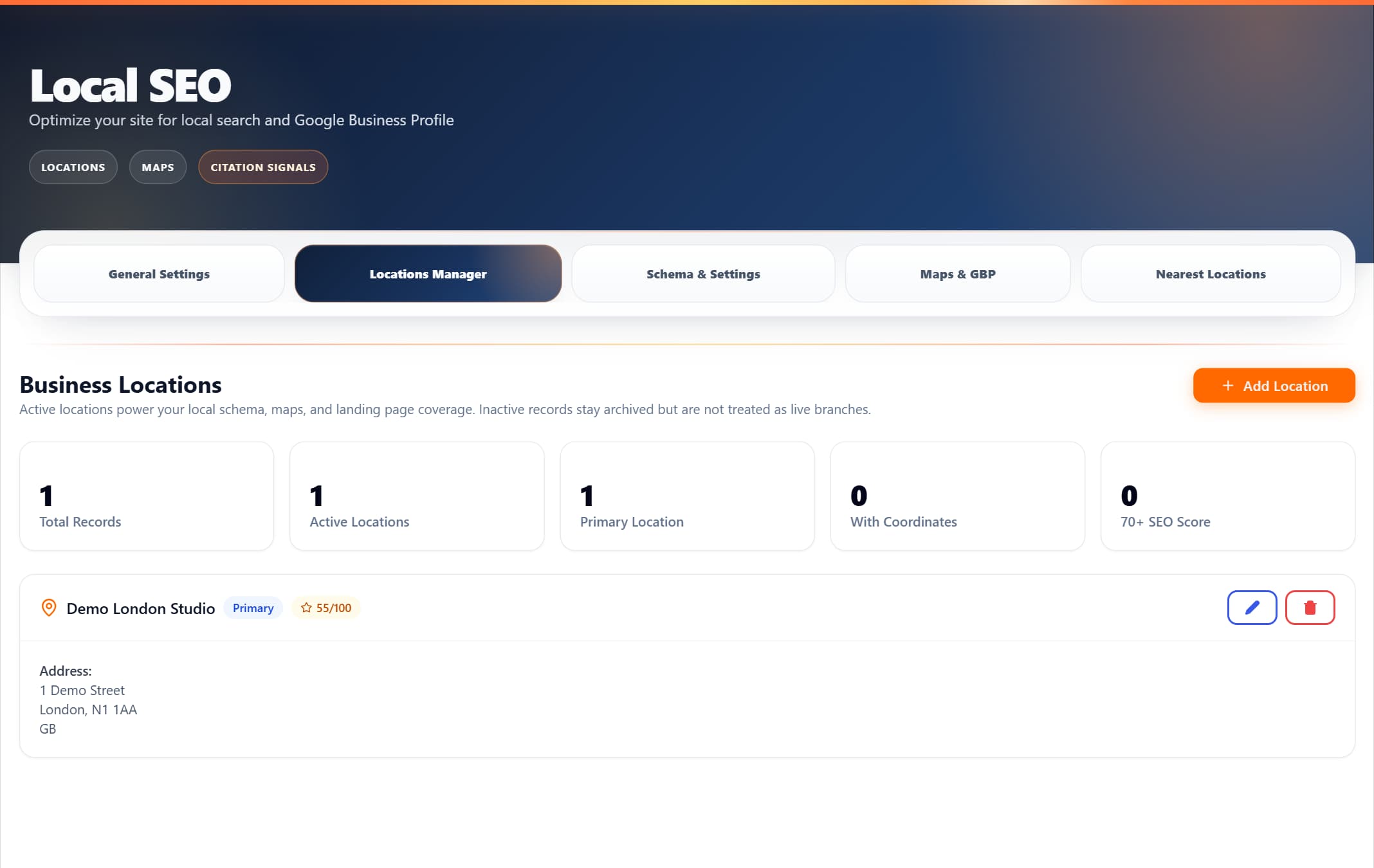
Manage locations, schema, Google Business Profile settings, and nearest-location rules from one Local SEO workspace.
No separate local SEO plugin needed
Everything you need for local search is built into ProRank alongside your SEO, performance, and schema tools.
How it works
Nine integrated local SEO tools that turn one location dataset into schema, landing-page content, and visitor discovery.
Locations Manager
Add and manage multiple business locations from one screen. Each location gets its own address, phone, opening hours, and geo coordinates — all stored in WordPress, no external dependency.
- Unlimited locations with individual address, phone, and coordinates
- Opening hours with day-by-day scheduling and holiday overrides
- Geo coordinates auto-fill or manual lat/lng entry
- Locations available via shortcode or automatic insertion
Nearest Locations
Add factual, location-specific content to templated landing pages. ProRank matches safe wildcard rules, resolves each place in the background, and shows the closest configured locations with real distances.
- Server-rendered nearest-location content remains stable for search engines and page caches
- Safe slug rules such as service-in-* target the right pages without accepting raw regular expressions
- Background geocoding never puts a third-party request in the page-render path
- Manual coordinates and pluggable providers support sites outside Great Britain
Store Finder
Add a searchable location finder anywhere with the [prorank_store_finder] shortcode. Visitors can search by place, filter active locations, and open directions or contact links.
- Search by location name, address, city, region, or postal code
- Radius, opening-hours, Wi-Fi, parking, and EV-charging filters
- Optional OpenStreetMap, MapTiler, or Mapbox tiles load only after Map is selected
- Opening-hours checks use the WordPress site timezone and support overnight hours
- Only active locations and approved public fields are returned to visitors
Private Device Location
Let visitors ask for results near their current position without changing the page Google sees. The browser permission prompt appears only after a click, and distance calculations stay on the device.
- Never requests location permission on page load
- Visitor coordinates are not sent to ProRank or your WordPress server
- Works as a progressive enhancement over cache-safe, server-rendered local content
- Accessible locating, denied, timeout, unavailable, and unsupported states
LocalBusiness Schema
Automatically generates Schema.org LocalBusiness markup for each location. Includes address, geo, opening hours, contact, and area served — all in JSON-LD format.
- Schema.org LocalBusiness with full PostalAddress and GeoCoordinates
- OpeningHoursSpecification for each day of the week
- Multi-area support (areaServed as City array) for service-area businesses
- Automatic @id linking so Google connects your locations to your Organization
Schema and Settings
Configure site-wide local SEO defaults: business type, primary location, service areas, and schema output preferences. Override per-location when needed.
- Business type selector (Restaurant, Store, Medical, Professional, etc.)
- Primary location designation for single-location businesses
- Service area configuration for businesses without a storefront
- NAP (Name, Address, Phone) consistency across all schema output
Maps and GBP
Connect Google Business Profile to preview and sync location data. The Store Finder can use OpenStreetMap, MapTiler, or Mapbox, while directions links can open Google Maps.
- Google Business Profile connection, preview, and synchronisation tools
- Optional Store Finder maps with three configurable tile providers
- Map tiles load only after a visitor opens the Map view
- Directions link generation for each location
KML Sitemaps
Publish coordinate-backed KML and location sitemap feeds so crawlers and mapping tools can discover your business locations.
- KML sitemap generation with placemarks for each location
- Automatic inclusion in your sitemap index
- Geo coordinates and business details in each placemark
- Only locations with valid coordinates are included
Citation Details
Centralise your business citation data so every mention of your business on your site is consistent. Reduces NAP inconsistencies that hurt local rankings.
- Central store for business name, address, phone, email, and website
- Consistent output across schema, shortcodes, and widgets
- Citation audit checks for NAP mismatches across your pages
- Structured data for multiple contact points (sales, support, billing)
Who needs local SEO
If customers find you by searching "near me" or a city name, you need local SEO.
Multi-location businesses
Restaurants, retail chains, clinics with multiple branches
Service-area businesses
Plumbers, electricians, cleaners who serve a region without a storefront
Single-location shops
Local stores, cafes, salons that want to rank in the map pack
Agencies managing client sites
Set up local SEO for clients without a separate local SEO plugin