Internal linking connects useful pages into a website readers can navigate. A guide introduces a topic, a focused article answers the next question, and a relevant product or service page helps the reader act. Those connections also give search engines paths through your content.
You control the links inside your own pages, so improving them is a practical part of ongoing SEO. Start with the content you already have, choose destinations deliberately and verify the result. This guide covers the strategy; the WordPress internal-link audit tutorial walks through the controls in ProRank 1.6.3.
What internal linking does
- Discovery: a crawlable link gives search engines a path to another page. A sitemap can help too, but it does not replace useful links for readers.
- Relationships: links show how guides, categories, services and products fit together. They are one signal in a much larger ranking system.
- Context: the anchor and surrounding sentence explain why someone should visit the destination.
Google recommends ordinary crawlable links and concise, descriptive anchor text. It also advises linking important pages from other relevant pages. There is no official universal link quota or guaranteed ranking increase for adding a link. Read Google’s link guidance.
Organise related pages around a useful main guide
Main guide
Explain the broad topic and help readers choose the next question to explore.
Focused tutorials
Solve a specific task, linking back to the main guide and to related instructions where useful.
Product or service pages
Explain how the relevant offering helps the reader complete that task.
For example, this strategy guide links to separate tutorials for auditing links, repairing broken destinations and connecting orphan pages. Each tutorial has a distinct purpose. A reader should not need to open three near-identical articles to finish one job.
Use category pages and navigation for broader orientation. Use contextual links inside articles to explain a specific next step. Both are useful; a link in navigation does not make a page an orphan merely because an article-text report has not counted it.
A practical example from this website
Our image-optimisation guide explains formats, sizing and delivery. Someone choosing software can then follow a link to our comparison of WordPress image optimisation plugins. The explanatory sentence tells the reader why that comparison is useful.
A page already listed on the blog index is not an orphan. Adding this contextual connection improves the route between related articles. That is a more precise reason for the edit than claiming the page was invisible to Google or promising an immediate ranking gain.
Build an internal-linking review into publishing
- Inventory the right content: include the public posts, pages and other content types relevant to your site. Note scan limits, exclusions and freshness.
- Choose useful targets: prioritise current services, products and guides that answer a real question. Review obsolete pages before sending more readers to them.
- Find relevant sources: read the source page and identify a sentence where the destination is a helpful next step. Traffic alone does not make an unrelated source suitable.
- Preview the edit: check the exact anchor, destination and placement before applying it.
- Verify as a visitor: check the published page and follow the link. A builder or cache can affect what visitors see.
- Refresh the report: rescan with the same scope after changes are live, and keep unresolved checks separate from confirmed failures.
Use the right workflow for each finding
- A page needs an incoming link: follow the orphan-page repair guide to choose a source and review a sentence.
- A destination no longer exists: use the broken-link guide to confirm the failure and select a meaningful replacement.
- A page has moved: link to its final URL and consider a redirect from the old address for existing bookmarks and external links.
- The same phrase appears across relevant content: preview a focused automatic-linking rule before running it.
A rate-limited check is not proof of a broken destination. A zero-change URL rule is not proof that the live page was repaired. Read each result in context, particularly when a page builder or shared template owns the visible content.
Review links with ProRank
In ProRank SEO → Link Operations, use Opportunities → Pages for page coverage and link inspection. The review inbox holds suggestions for review, while Broken Links, Automation and URL Changes handle their respective tasks.
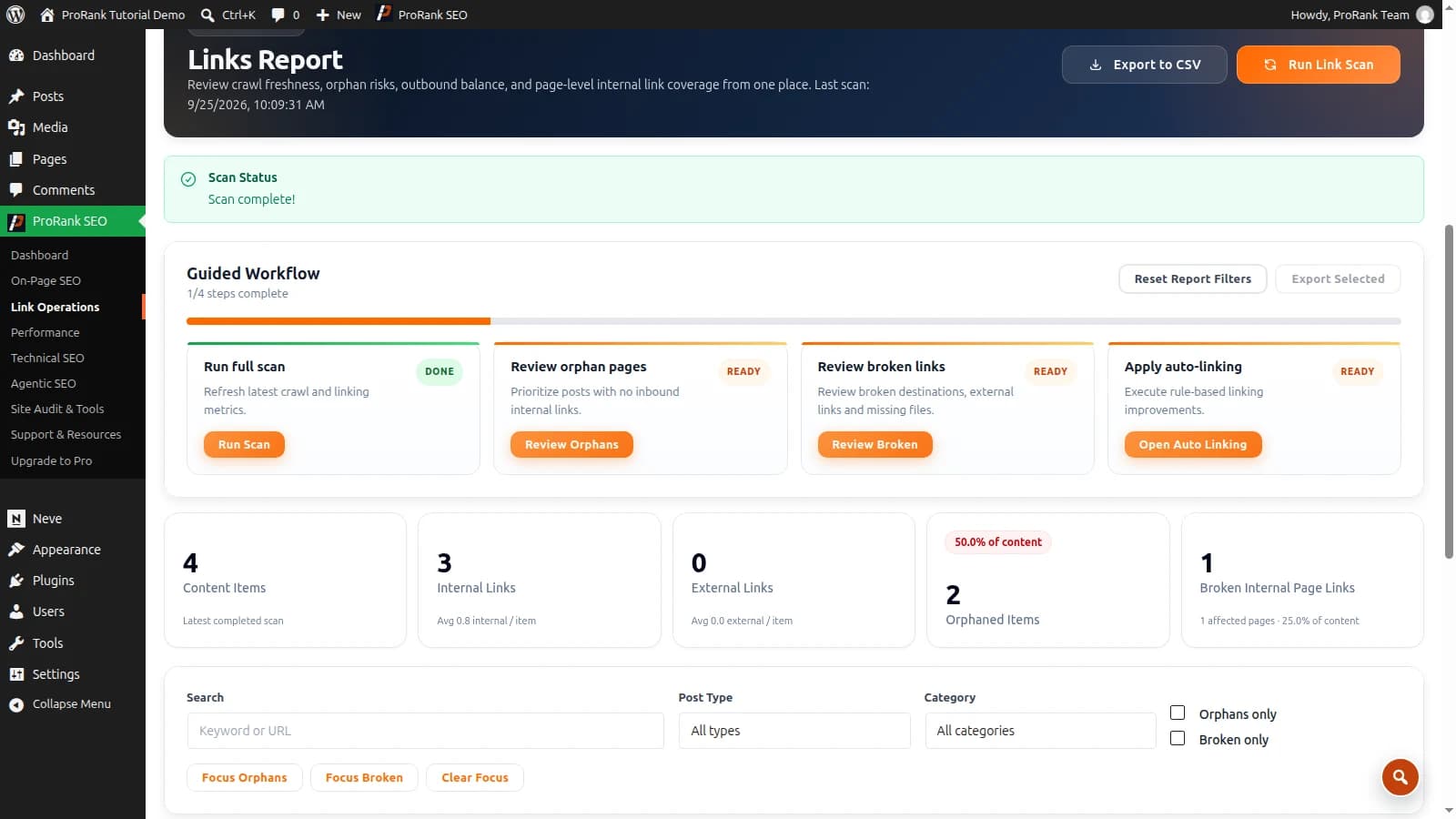
The step-by-step audit tutorial covers scan scope, previews, verification and careful automation. The internal-linking documentation explains individual features. For a broader view of site health, run a free SEO audit.
Frequently asked questions
- What is internal linking in SEO, with an example?
- An internal link connects two pages on the same website. For example, an image-optimisation guide can link to a comparison of image plugins. The link helps the reader take a useful next step and gives search engines context about the destination.
- How does internal linking help SEO?
- Internal links help search engines discover pages, understand their relationships and interpret their subject through anchor text. They also help visitors move between related content. These benefits do not guarantee indexing or rankings for any particular page.
- How many internal links should a page have?
- There is no universal quota. Add links where they help the reader understand a subject or take a relevant next step. Check that important pages receive useful incoming links, and avoid repeated or distracting links added simply to meet a number.
- What is an orphan page?
- An orphan page has no incoming internal links from other pages on the same website. It may still be discoverable through a sitemap or external link. Verify the scan scope and the rendered website before treating a report finding as proof that the page has no incoming links anywhere.
- Do internal links need exact-match anchor text?
- No. Use natural, descriptive wording that accurately describes the destination. Vary it when the context calls for it and avoid forced repetition. The reader should understand what will open before following the link.