
Real-time Collaboration
Transform your SEO workflow with powerful real-time collaboration features that keep your entire team in sync. Choose from multiple WebSocket providers, see who's working on what, prevent editing conflicts, and communicate seamlessly—all within ProRank SEO's modern tabbed interface.
What's New in Version 2.0
Multi-Provider Support
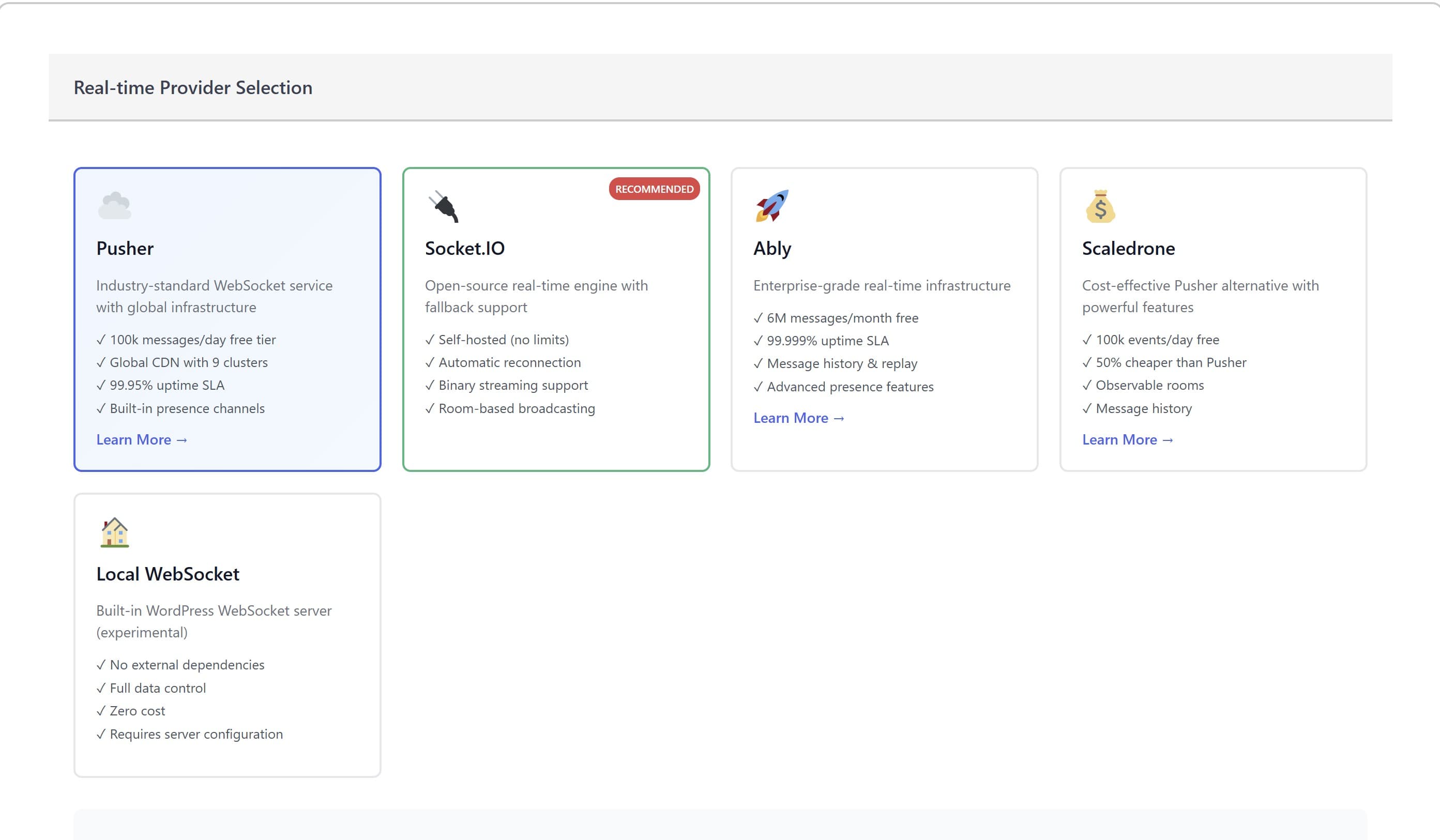
Choose from Pusher, Socket.IO, Ably, Scaledrone, or Local WebSocket based on your needs
Tabbed Interface
Clean organization with Provider Setup, Settings, Activity Monitor, and Advanced tabs
Interface Overview
Navigation Tabs
The collaboration interface is organized into four main tabs for easy access to all features:
Select and configure your preferred WebSocket provider. Each provider shows features, pricing, and setup requirements.
Enable/disable specific features like edit locking, comments, cursor tracking, and typing indicators.
View active users, current locks, and recent comments in real-time. Shows user count badge when active.
Configure Slack integration, performance settings, and debug options.
Connection Status Bar
The status bar at the top shows your real-time connection status with color-coded indicators:
- 🟢 Green - Connected and active
- 🟡 Yellow - Testing connection
- 🔴 Red - Connection error
- ⚪ Gray - Not configured
Active user avatars appear on the right side of the status bar, showing who's currently online.
Available Providers
| Provider | Free Tier | Best For | Setup Difficulty |
|---|---|---|---|
| Pusher ☁️ | 100k messages/day | Quick setup, reliable service | Easy |
| Socket.IO 🔌 Recommended | Unlimited (self-hosted) | Full control, no limits | Medium |
| Ably 🚀 | 6M messages/month | Enterprise reliability (99.999% uptime) | Easy |
| Scaledrone 💰 | 100k events/day | Cost-effective (50% cheaper than Pusher) | Easy |
| Local WebSocket 🏠 | Unlimited | Complete privacy, no external dependencies | Advanced |
Collaboration Features
Edit Locking
Automatically locks fields when someone starts editing. Prevents simultaneous edits and data conflicts. Locks auto-release after the configured timeout (default: 5 minutes).
Inline Comments
Add contextual comments directly on settings and content. Comments appear in real-time for all users. Perfect for feedback and discussions without leaving the interface.
Live Presence
See who's viewing which pages in real-time. User avatars and status indicators show active/idle states. Know exactly who's working on what at any moment.
Cursor & Typing Indicators
See other users' cursor positions with color-coded indicators. Typing indicators show when someone is actively entering text. Creates a truly collaborative experience.
Version History
Track all changes with timestamps and user attribution. Roll back to previous versions when needed. Never lose important work or wonder who made changes.
Slack Integration
Send notifications to Slack channels for important events. Keep your team informed even when they're not in the WordPress admin.
Quick Start Guide
Step 1: Choose Your Provider
Navigate to Agency Hub → Collaboration and click the Provider Setup tab. Review the available providers and click on your preferred option. We recommend Socket.IO for full control or Pusher for quick setup.
Step 2: Configure Provider Credentials
Based on your selected provider:
1. Sign up at https://pusher.com (free account available)
2. Create a new Channels app
3. Copy your credentials:
   - App ID: Found in App Keys section
   - Key: Your public key
   - Secret: Your private key (keep secure)
   - Cluster: Select closest to your users
4. Enter credentials in ProRank SEO
5. Click "Test Connection"1. For hosted Socket.IO:
- Enter your server URL
- Specify port (default: 3000)
- Enable SSL if using HTTPS
2. For local Socket.IO:
- Leave URL empty for auto-setup
- Enable "Auto-start server"
- Ensure Node.js is installedStep 3: Enable Features
Switch to the Collaboration Settings tab and enable your desired features:
- ✅ Edit Locking - Recommended for all teams
- ✅ Live Presence - See who's online
- ✅ Inline Comments - For team communication
- ✅ Cursor Tracking - For visual collaboration
- ✅ Typing Indicators - See real-time activity
- ✅ Version History - Track all changes
Step 4: Test Your Setup
- Click “Test Connection” to verify provider setup
- Open ProRank SEO in another browser or incognito window
- Navigate to the same page in both windows
- You should see presence indicators showing both sessions
- Try editing a field - it should lock in the other window
Activity Monitor
The Activity Monitor tab provides real-time visibility into team collaboration:
Active Users Section
- Shows all currently connected users with avatars
- Displays user status (🟢 Active or 🟡 Idle)
- Shows which page each user is viewing
- Updates automatically as users join/leave
Active Locks Section
- Lists all current edit locks
- Shows who owns each lock
- Displays remaining time before auto-release
- Allows admins to force-release locks if needed
Recent Comments Section
- Shows latest 5 comments across all areas
- Displays comment author, timestamp, and content
- Click to jump to comment location
- Real-time updates as new comments are added
Advanced Configuration
The Advanced tab provides fine-tuning options for power users:
Slack Integration
1. Create Slack Webhook:
   - Go to api.slack.com/apps
   - Create new app → From scratch
   - Add "Incoming Webhooks" feature
   - Activate and add to workspace
   - Copy webhook URL

2. Configure in ProRank:
   - Paste webhook URL in Advanced tab
   - Enable Slack Notifications
   - Choose notification events
Performance Settings
- Update Interval: How often to sync (default: 1000ms)
- Max Reconnect Attempts: Retry limit for connection failures (default: 5)
- Heartbeat Interval: Keep-alive ping frequency (default: 30000ms)
Fallback Provider
Enable automatic failover to a backup provider if the primary connection fails. Useful for mission-critical environments requiring high availability.
Security & Privacy
- Provider credentials are encrypted using WordPress salts
- WebSocket connections use SSL/TLS encryption
- User permissions are enforced for all operations
- Session data is not stored on external servers (except provider routing)
Data Handling by Provider
- Pusher/Ably/Scaledrone: Message routing only, no content storage
- Socket.IO (self-hosted): Complete data control on your server
- Local WebSocket: All data stays within your WordPress installation
Common Issues & Solutions
Connection shows “Error” status
- Verify provider credentials are correct
- Check if your firewall allows WebSocket connections
- Ensure the selected cluster/region is operational
- Try using a different provider as a test
Not seeing other users in Activity Monitor
- Confirm both users have Agency+ tier licenses
- Check that “Live Presence” is enabled in settings
- Verify both users are on the same provider configuration
- Clear browser cache and reconnect
Edit locks not releasing automatically
- Check lock timeout setting (default: 5 minutes)
- Admins can force-release locks from Activity Monitor
- Locks release on user logout or session end
- Browser refresh will release user's current locks
Socket.IO self-hosted not connecting
- Ensure Node.js is installed (v14+ required)
- Check if port 3000 (or configured port) is available
- Verify SSL certificate if using HTTPS
- Check server logs for specific errors
Best Practices
For Optimal Performance:
- ✓ Use Socket.IO for teams larger than 10 members
- ✓ Enable only the features you actively use
- ✓ Set appropriate lock timeout based on typical edit duration
- ✓ Configure Slack for important notifications only
- ✓ Use regional clusters/servers closest to your team
- ✓ Implement fallback provider for critical operations
- ✓ Regular cleanup of old comments and history
- ✓ Train team on lock release best practices
Developer Reference
For developers integrating with the collaboration system:
REST API Endpoints
POST   /wp-json/prorank-seo/v1/collaboration/auth
POST   /wp-json/prorank-seo/v1/collaboration/lock
DELETE /wp-json/prorank-seo/v1/collaboration/lock
GET    /wp-json/prorank-seo/v1/collaboration/locks
POST   /wp-json/prorank-seo/v1/collaboration/presence
GET    /wp-json/prorank-seo/v1/collaboration/comments
POST   /wp-json/prorank-seo/v1/collaboration/comments
POST   /wp-json/prorank-seo/v1/collaboration/test-connection
POST   /wp-json/prorank-seo/v1/settings/collaboration
WebSocket Events
// Listen for events
channel.bind('lock-acquired', (data) => {
  console.log('Lock acquired:', data);
});

channel.bind('presence-update', (data) => {
  console.log('User presence changed:', data);
});

// Trigger events
channel.trigger('client-cursor-move', {
  x: mouseX,
  y: mouseY,
  element: elementId
});
Version History
Version 2.0.0 - Current
Released: January 2025
- • Added multi-provider support (5 providers)
- • New tabbed interface design
- • Cursor tracking and typing indicators
- • Slack integration
- • Enhanced security with credential encryption
- • Fallback provider support
- • Activity Monitor dashboard
Version 1.0.0
Released: December 2024
- • Initial release with Pusher support
- • Basic edit locking
- • User presence tracking
- • Comment system