
E-E-A-T Monitor
Track and improve your site's Expertise, Experience, Authoritativeness, and Trustworthiness signals to rank better in Google and build user trust.
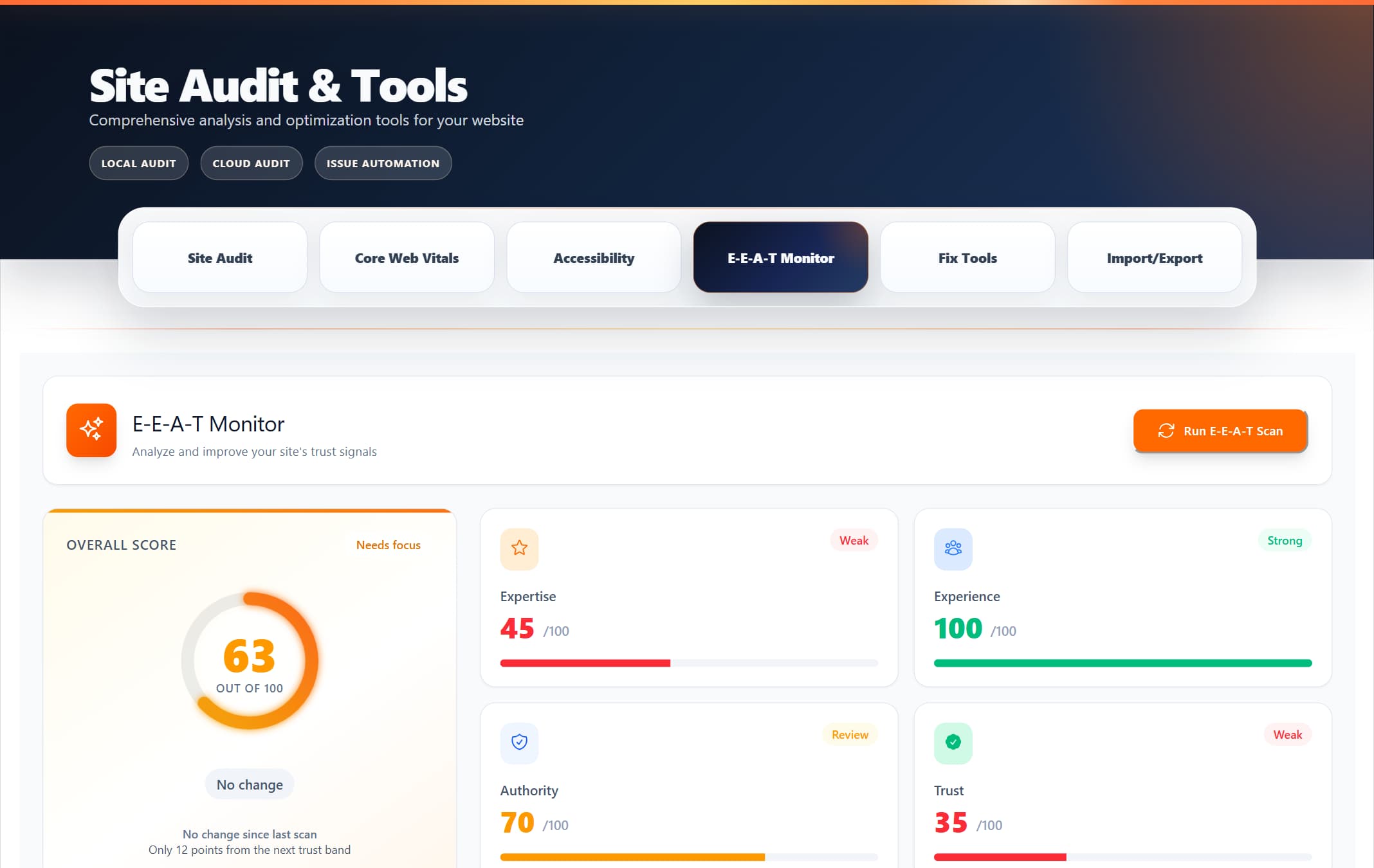
ProRank 1.6.0 · WordPress demo · Captured 5 September 2026
What is E-E-A-T?
E-E-A-T stands for Expertise, Experience, Authoritativeness, and Trustworthiness. These are quality signals that Google uses to evaluate content, especially for YMYL (Your Money or Your Life) topics like health, finance, and safety. Strong E-E-A-T signals help your content rank better and build user trust.
Expertise
Demonstrates your knowledge and skills in your content area
Experience
Shows real-world, hands-on experience with the topic
Authoritativeness
Establishes you as a trusted source in your field
Trustworthiness
Builds confidence through transparency and security
Getting Started
How to Access E-E-A-T Monitor
- Navigate to ProRank SEO → Site Audit & Tools → E-E-A-T Monitor
- The dashboard shows your current E-E-A-T status immediately
- Click "Run E-E-A-T Scan" to analyse your entire site
Running Your First Scan
When you run a scan, the E-E-A-T Monitor analyses:
- All your published content for quality signals
- Author information and credentials across your site
- YMYL pages for visible "reviewed by" or "fact checked by" attribution
- External links and citations to authoritative sources
- Site-wide trust indicators like SSL, contact info, organization schema, visible phone/address details, and policies
Understanding the Dashboard
Overall Score Display
The main dashboard shows your overall E-E-A-T score (0-100) in a circular progress indicator. This score is the average of your four component scores:
- 80-100: Excellent - Your site has strong E-E-A-T signals
- 60-79: Good - Solid foundation with room to improve
- 40-59: Fair - Several areas need attention
- 0-39: Poor - Critical improvements needed
Component Scores
Each E-E-A-T component is scored individually and displayed with:
- A visual progress bar showing the score
- Color coding (green for good, orange for fair, red for poor)
- The exact score out of 100
Radar Chart Visualization
The radar chart provides a quick visual comparison of all four components, making it easy to identify your strongest and weakest areas at a glance.
Score Trends (30 Days)
Track your progress over time with:
- Line chart showing daily score changes
- Trend indicator showing if you're improving (↑), declining (↓), or stable (→)
- Percentage change from 30 days ago
What Gets Analysed
Expertise Analysis
The monitor checks for:
- Author Information: Whether posts have clearly identified authors
- Author Credentials: Professional qualifications, licences, registrations, and memberships mentioned in author bios
- YMYL Review Signals: Whether health, medical, finance, legal, safety, and similar pages show a visible reviewer or fact-checker
- Content Depth: How thoroughly topics are covered
- Technical Accuracy: Use of proper terminology and concepts
Experience Analysis
The system looks for:
- First-Hand Examples: Personal stories and case studies
- Practical Insights: Tips that come from real experience
- Author History: How long authors have been writing about topics
- Content Specificity: Detailed, specific information vs generic content
Authoritativeness Analysis
Key factors include:
- Citation Quality: Links to reputable, authoritative sources
- Content Freshness: How recently content has been updated
- Internal Linking: Topical clusters and content depth
- Domain Authority: Overall site reputation and backlink profile
Trustworthiness Analysis
Trust signals checked:
- SSL Certificate: HTTPS enabled across the site
- Contact Information: Easy-to-find contact details
- Organization Schema: Structured data that identifies the organization or local business
- Visible NAP Signals: Phone and address details visible on the homepage or contact page
- Privacy Policy: Clear data handling practices
- About Page: Transparent information about your organization
- Terms of Service: Clear user agreements
- Author Transparency: Real names and verifiable information
Understanding Issues
Issue Severity Levels
Critical problems that significantly impact your E-E-A-T scores. Examples:
- No SSL certificate (site not using HTTPS)
- Missing author information on posts
- No privacy policy or contact page
- Content with no supporting citations
Important improvements that will boost your scores. Examples:
- Incomplete author bios
- Low-quality external citations
- Outdated content (not updated in 12+ months)
- Missing about page or organization info
Minor optimisations for further improvement. Examples:
- Authors without social media links
- Content could use more citations
- Minor freshness updates needed
- Additional trust badges could help
Issues Summary Panel
The issues summary shows a quick count of all detected problems organised by severity. This helps you prioritize which issues to tackle first for maximum impact.
Detailed Issues Table
Each issue in the table displays:
- Issue Type: What specific problem was detected
- Component: Which E-E-A-T component is affected
- Severity: High, Medium, or Low priority
- Affected Items: Which posts, pages, or site areas have this issue
- Status: Open, Fixed, or Ignored
- Actions: Options to fix or manage the issue
Fixing E-E-A-T Issues
Manual Fixes
Most issues require manual attention. Common fixes include:
- Adding Author Bios:Go to Users → Edit User → Biographical Info to add detailed author descriptions
- Improving Citations:Edit posts to add links to authoritative sources (.gov, .edu, major publications)
- Creating Trust Pages:Add About, Contact, Privacy Policy, and Terms pages if missing
- Updating Content:Refresh old posts with current information and mark them as updated
Issue Status Management
After fixing an issue, you can:
- Mark as Fixed: Indicates you've resolved the issue
- AI Advice: Generates practical next steps; if the configured AI provider fails, ProRank shows a built-in fallback recommendation
- Ignore Issue: Dismisses issues that don't apply to your site
- Re-scan: Run a new scan to verify fixes were successful
Filtering and Sorting
Use the filter dropdowns to focus on specific issues:
- Component Filter: Show only Expertise, Experience, Authoritativeness, or Trust issues
- Severity Filter: Focus on High, Medium, or Low priority items
- Combination: Use both filters together for precise issue management
Best Practices for High E-E-A-T Scores
Author Best Practices
- Create detailed author bios (minimum 100 words) highlighting expertise
- Include professional credentials, certifications, and experience
- Add professional headshots to author profiles
- Link to author social media profiles (LinkedIn, Twitter)
- Use real names, not pseudonyms or generic accounts
- Have subject matter experts write or review content in their field
Content Best Practices
- Always assign a specific author (never use "admin" or generic accounts)
- Include 3-5 high-quality external citations per article
- Cite authoritative sources: government sites, universities, established media
- Add personal experiences and case studies to show first-hand knowledge
- Update content regularly (at least annually for evergreen topics)
- Create comprehensive, in-depth content that fully covers topics
Site Trust Best Practices
- Ensure SSL certificate is active (HTTPS on all pages)
- Create detailed About page explaining who you are and your mission
- Provide multiple contact methods (email, phone, address if applicable)
- Maintain up-to-date Privacy Policy and Terms of Service
- Display trust badges, certifications, and affiliations
- Respond to comments and user feedback promptly
Citation Quality Guidelines
When adding citations, prioritize these source types:
- Highest Authority: .gov, .edu, scientific journals, major research institutions
- High Authority: Established news outlets, industry publications, expert blogs
- Good Authority: Reputable organizations, well-known brands, Wikipedia (for general info)
- Avoid: Unknown blogs, social media posts, outdated sources, broken links
Monitoring Your Progress
Regular Scanning Schedule
For best results, run E-E-A-T scans:
- Weekly: If actively improving E-E-A-T signals
- Bi-weekly: For maintenance and monitoring
- Monthly: Minimum recommended frequency
Tracking Improvements
Monitor your progress through:
- Score trends chart showing 30-day history
- Component score changes over time
- Issue count reduction as you fix problems
- Overall score improvement percentage
Setting Goals
Realistic E-E-A-T improvement goals:
- Month 1: Fix all high-priority issues, aim for 50+ score
- Month 2: Address medium issues, target 65+ score
- Month 3: Optimise low-priority items, achieve 75+ score
- Ongoing: Maintain 80+ score with regular monitoring
Impact on SEO Performance
Strong E-E-A-T signals directly influence your search rankings:
- YMYL Content:Critical for health, finance, legal, and safety topics where Google applies stricter standards
- Featured Snippets:Google prefers content from authoritative sources for position zero
- Core Algorithm Updates:E-E-A-T is a major factor in Google's quality assessments
- User Trust:Visible E-E-A-T signals improve click-through rates and conversions
- Brand Building:Establishes your site as a trusted resource in your industry
Troubleshooting Common Issues
Scan Not Completing
- Check if you have published posts (drafts aren't scanned)
- Verify your Business+ licence is active
- Look for JavaScript errors in browser console
- Try refreshing the page and running again
Score Not Improving After Fixes
- Run a fresh scan - scores update only after new scans
- Ensure issues are actually fixed, not just marked as fixed
- Some improvements take time to reflect in scores
- Check if new issues have appeared offsetting improvements
Missing Author Information
- Verify authors are WordPress users, not just names
- Check that posts have authors assigned in post settings
- Ensure author archive pages are enabled in your theme
- Add biographical info in user profiles
Integration with Other Features
E-E-A-T Monitor works best when combined with other ProRank SEO features:
- Schema Markup:Automatically adds Person and Organization schema to reinforce E-E-A-T signals
- Content Analysis:Ensures your content quality matches your E-E-A-T claims
- Internal Linking:Builds topical authority through strategic linking
- Knowledge Graph:Establishes entity relationships for better understanding
- Local SEO:Reinforces trust through local business information
Frequently Asked Questions
How often should I run E-E-A-T scans?
Run scans weekly when actively improving, bi-weekly for monitoring, or monthly at minimum. After major content updates, run an immediate scan to see the impact.
What's a good E-E-A-T score to aim for?
Aim for 75+ for general sites, 80+ for YMYL content. Scores above 85 indicate excellent E-E-A-T signals that should positively impact rankings.
Do all sites need strong E-E-A-T?
While all sites benefit, E-E-A-T is critical for YMYL topics (health, finance, legal). Entertainment or hobby sites can succeed with moderate E-E-A-T scores.
Can I ignore some E-E-A-T issues?
Yes, use the "Ignore" feature for issues that don't apply. For example, personal blogs might not need extensive author credentials for lifestyle content.
How quickly will I see SEO improvements?
E-E-A-T improvements typically show results in 2-3 months. Major improvements might be noticed after Google's next core algorithm update.