
AI Content Generation
Create high-quality, SEO-optimised content with AI assistance
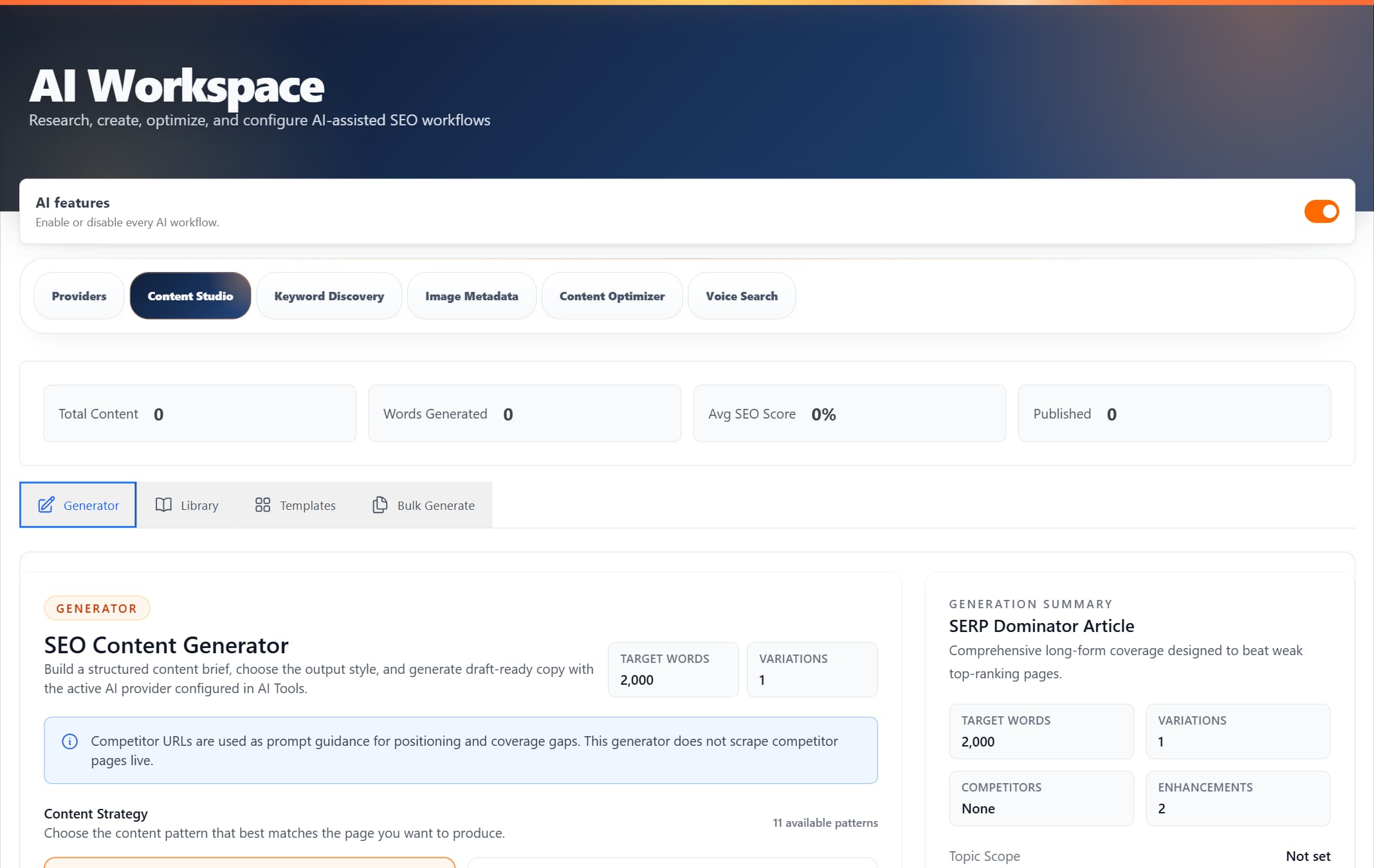
ProRank 1.6.0 · WordPress demo · Captured 5 September 2026
Transform Your Content Creation Process
ProRank's Content Generation helps you create engaging, SEO-friendly content in minutes. Whether you're writing SEO-focused articles using strategy patterns like SERP Dominator, Featured Snippet Hunter, and FAQ + Schema Markup, our AI tools make content creation faster and more effective.
What Makes ProRank Content Generation Special
Smart Content Creation
Generate any type of content - SERP Dominator articles, Featured Snippet content, People Also Ask posts, FAQ + Schema pages, and How-To guides
SEO Optimisation Built-In
Every piece of content is automatically optimised for search engines
Content Library
Save and organise all your generated content in one place
Ready-to-Use Templates
8 default SEO templates to get you started immediately
Bulk Generation
Create multiple pieces of content at once to save time
Performance Tracking
Monitor your content's SEO score and readability metrics
Template Sharing
Reuse and share template workflows across your content process
Flexible Options
Customise tone, style, and length to match your brand
Four Powerful Tools in One System
Everything you need for AI-powered content creation
Content Generator
The main interface for creating new content with AI
Content Library
Store and manage all your generated content
Templates
Ready-made templates for common content needs
Bulk Generate
Generate multiple pieces of content at once
8 Ready-to-Use SEO Templates
Start creating content immediately with our default templates
Featured Snippet Optimiser
Create content optimised for Google's featured snippets
E-E-A-T Content Framework
Build authoritative content following Google's quality guidelines
Skyscraper Content Builder
Create comprehensive content that outperforms competitors
Local SEO Template
Generate location-specific content for local search
Keyword Research Template
Comprehensive keyword research and analysis format
Link Building Outreach
Create effective outreach messages for link building
People Also Ask Expander
Answer common PAA questions comprehensively
Schema Markup Generator
Generate structured data markup for rich results
How to Generate Your First Content
Open Content Generator
Navigate to AI Tools → Content Generation in your WordPress admin
Choose Content Type
Select what you want to create: blog post, product description, FAQ, etc.
Enter Your Topic
Provide your main topic and any keywords you want to target
Customise Settings
Adjust tone, style, and length to match your needs
Generate & Review
Click generate, review the content, and save it to your library or create a WordPress draft
Track Your Content Performance
Monitor key metrics from your dashboard
| Metric | Description |
|---|---|
| Total Content | Number of content pieces in your library |
| Words Generated | Total word count of all generated content |
| Avg SEO Score | Average SEO optimisation score (0-100%) |
| Published | Content pieces published to your site |
License Requirements
Pro+Included Features
- ✓ Content Generator
- ✓ Content Library
- ✓ Default Templates
- ✓ Basic content types
- ✓ Save and organise content
- ✓ SEO optimisation
Pro+Additional Features
- ✓ Bulk Generation
- ✓ Custom Templates
- ✓ Advanced content types
- ✓ CSV/manual campaign input
- ✓ Export capabilities
- ✓ Template sharing options
Tips for Better Content
- • Be specific with your topic - the more detail you provide, the better the output
- • Include your target keywords naturally in the topic description
- • Use templates for consistent formatting across similar content
- • Review and edit AI content to add your unique voice and expertise
- • Save successful prompts as templates for future use
Troubleshooting Common Issues
Content Library Shows "Empty"
This is normal for new installations. Start generating content and it will appear in your library.
Templates Tab Shows Default Templates Only
The 8 default templates are always available. You can create custom templates by clicking "Create Template".
Bulk Generate Requires Pro License
Bulk generation is a Pro+ feature. Upgrade your license to unlock this capability.
Ready to Start Creating?
Explore each component in detail